
Every nonprofit executive knows that every dollar counts toward advancing their mission. Yet many organizations still struggle with outdated IT infrastructure that drains resources and diverts attention from their core work. Enter the server in cloud – a transformative technology that’s revolutionizing how mission-driven organizations approach their computing needs.
A cloud server represents a fundamental shift from traditional on-premises hardware to virtualized computing resources delivered over the internet. Instead of purchasing, maintaining, and housing physical servers in your office, you can access powerful computing resources on demand from cloud service providers. This approach transforms technology from a capital-intensive burden into a flexible, scalable tool that grows with your organization.
This comprehensive guide will walk you through everything you need to know about cloud servers – from basic concepts to advanced deployment strategies. Whether you’re considering your first cloud migration or looking to optimize your existing cloud infrastructure, you’ll discover practical insights to make informed decisions that protect your data, reduce costs, and amplify your mission impact.
What is a Server in Cloud?
A cloud server is a virtualized computing resource hosted in a cloud environment and ac
- What is a Server in Cloud?
- How Cloud Servers Work
- Types of Cloud Servers
- Key Benefits of Cloud Servers
- Cloud Server Deployment Models
- Common Use Cases and Applications
- Cloud Servers vs Traditional Physical Servers
- Security and Compliance in Cloud Servers
- Cost Considerations and Pricing Models
- Future Trends in Cloud Server Technology
- Choosing the Right Cloud Server Solution
- Conclusion
The core concept revolves around virtualization technology. Physical servers in massive data centers are divided into multiple virtual instances using hypervisor technology. This process creates multiple virtual servers from a single physical machine, with each virtual server operating independently despite sharing the underlying hardware.
Key characteristics that define cloud servers include:
Pooled Resources: Computing power, memory, and storage space are allocated on-demand from a shared infrastructure pool. This means you only use and pay for what you need, when you need it.
Remote Access: Users connect to their virtual servers through web interfaces or APIs rather than requiring physical access to hardware. This enables your team to manage IT resources from anywhere with an internet connection.
Infrastructure-as-a-Service Delivery: Cloud servers are typically provided as Infrastructure-as-a-Service (IaaS) by major cloud service providers like AWS, Microsoft Azure, and Google Cloud. These providers handle all the underlying infrastructure management while you focus on your applications and data.
Dynamic Scalability: Resources can be adjusted instantly based on changing needs. Need more processing power for your annual fundraising campaign? Scale up in minutes. Quiet period between events? Scale down to save costs.
This virtualization approach eliminates the need for organizations to maintain physical infrastructure on-site, transforming IT from a capital expense into a flexible operational expense that aligns with your mission’s changing needs.

How Cloud Servers Work
Understanding how cloud servers operate helps demystify the technology and builds confidence in making strategic IT decisions. The magic happens through sophisticated virtualization technology and orchestration systems that make complex infrastructure appear simple and accessible.
Virtualization Technology: At the foundation, hypervisors create multiple virtual machines from single physical servers. These hypervisors act as a software layer that manages and distributes physical server resources – CPU cores, memory, storage, and network connectivity – across virtual instances. Each virtual server operates independently, with guaranteed resource allocation, despite sharing underlying hardware.
Resource Allocation: When you provision a cloud server, the system dynamically distributes computing resources based on your specifications. Need a basic web server? You might receive 1 virtual CPU with 2 GB of memory. Running complex data analytics? You could scale up to 96 virtual CPUs with 384 GB of memory. This allocation happens instantly through automated systems.
Orchestration Platforms: Cloud management platforms automatically handle server provisioning, configuration, and ongoing management. When you click “create server” in a control panel, sophisticated orchestration software identifies available resources, configures your virtual machine, installs your chosen operating system, and makes it accessible within minutes.
Load Balancing: Traffic and workloads are intelligently distributed across multiple servers to ensure optimal performance. If one virtual server experiences high demand, the load balancing system can automatically redirect traffic to other instances or spin up additional resources.
API Management: Everything operates through programmatic interfaces that enable automated server provisioning and scaling. These RESTful APIs allow integration with other business systems and enable advanced automation scenarios. Your development team can script infrastructure changes, enabling faster deployment and more responsive scaling.
Distributed Infrastructure: Cloud servers operate in geographically distributed facilities with redundant power systems, cooling infrastructure, and network connectivity. This distribution provides inherent disaster recovery capabilities and ensures your services remain available even if individual data centers experience issues.
The result is computing infrastructure that appears infinitely scalable and always available, while the complex underlying technology remains invisible to end users.
Types of Cloud Servers
Understanding different cloud server types helps you select the optimal configuration for your specific workload requirements and budget constraints. Each type serves distinct use cases and offers different performance characteristics.
By Hosting Model
Shared Cloud Servers: Multiple tenants share underlying hardware resources with logical isolation between instances. This represents the most cost-effective option, ideal for standard web applications, development environments, and non-critical workloads. Your virtual server operates independently despite sharing physical hardware with other organizations.
Dedicated Cloud Servers: Exclusive access to physical server resources for a single tenant organization. While more expensive, dedicated instances provide enhanced performance consistency, security isolation, and compliance capabilities essential for sensitive workloads or high-performance applications.
Virtual Private Servers (VPS): A dedicated portion of shared hardware with guaranteed resource allocation. VPS solutions bridge the gap between shared and dedicated hosting, offering resource guarantees at moderate pricing. This option suits growing organizations that need performance consistency without dedicated server costs.
Bare Metal Servers: Direct access to physical hardware without the virtualization layer. These servers provide maximum performance for specialized workloads that require direct hardware access, such as high-performance databases or applications with specific hardware requirements.
By Configuration
Instance Type | CPU Cores | Memory | Storage | Best For |
|---|---|---|---|---|
General Purpose | 1-16 vCPUs | 2-64 GB | 20-1,600 GB | Web hosting, small databases |
Compute-Optimized | 2-32+ vCPUs | 4-256 GB | 25-3,200 GB | Analytics, scientific computing |
Memory-Optimized | 2-128 vCPUs | 15-4,000 GB | 25-6,400 GB | In-memory databases, big data |
Storage-Optimized | 2-64 vCPUs | 8-512 GB | 1,800-48,000 GB | Data warehousing, distributed file systems |
GPU Instances | 4-96 vCPUs | 15-768 GB | 50-7,500 GB | Machine learning, video processing |
Instance Type
CPU Cores
Memory
Storage
Best For
General Purpose
1-16 vCPUs
2-64 GB
20-1,600 GB
Web hosting, small databases
Compute-Optimized
2-32+ vCPUs
4-256 GB
25-3,200 GB
Analytics, scientific computing
Memory-Optimized
2-128 vCPUs
15-4,000 GB
25-6,400 GB
In-memory databases, big data
Storage-Optimized
2-64 vCPUs
8-512 GB
1,800-48,000 GB
Data warehousing, distributed file systems
GPU Instances
4-96 vCPUs
15-768 GB
50-7,500 GB
Machine learning, video processing
General Purpose Instances: Balanced CPU, memory, and networking resources for typical workloads. These versatile instances handle most web applications, content management systems, and small to medium databases efficiently.
Compute-Optimized: High-performance processors optimized for CPU-intensive applications. Perfect for scientific simulations, batch processing, web servers handling high traffic, or applications requiring significant processing power.
Memory-Optimized: Large RAM allocation for applications that process substantial datasets in memory. Ideal for in-memory databases, big data analytics, real-time processing, and applications requiring fast data access.
Storage-Optimized: Enhanced disk I/O performance for data-heavy applications. These instances excel at distributed file systems, data warehousing, search engines, and applications requiring high sequential read/write performance.
GPU Instances: Specialized graphics processing units for parallel processing tasks. Essential for machine learning model training, video rendering, scientific simulations, and artificial intelligence workloads.
Key Benefits of Cloud Servers
Cloud servers deliver compelling advantages that enable organizations to redirect resources from infrastructure management toward mission-critical activities. These benefits fundamentally transform how nonprofits and service-based organizations approach technology.
Cost Efficiency: The pay as you go pricing model eliminates upfront hardware investments and reduces total cost of ownership. Instead of purchasing servers that may cost $5,000-$50,000 upfront, you can start with virtual servers for as little as $5 per month. This transformation from capital expenses to operational expenses improves cash flow and enables more predictable budgeting.
Instant Scalability: Computing resources can be scaled up or down within minutes based on changing demands. During fundraising campaigns or special events, you can temporarily increase capacity to handle traffic spikes, then scale back during quiet periods to control costs. This elasticity ensures optimal performance without maintaining expensive idle capacity.
Global Accessibility: Teams can access cloud infrastructure 24/7 from anywhere with internet connectivity. Remote staff, volunteers, and board members can securely access organizational systems without complex VPN configurations or geographic limitations. This flexibility proves especially valuable for distributed organizations or during crisis situations requiring remote work.
High Availability: Enterprise-grade infrastructure delivers 99.9%+ uptime through redundant systems and automatic failover capabilities. Cloud providers invest billions in reliability infrastructure that would be prohibitively expensive for individual organizations to replicate. Built-in redundancy across multiple data centers protects against hardware failures, power outages, and natural disasters.
Managed Maintenance: Cloud service provider teams handle hardware updates, security patches, and infrastructure management around the clock. This eliminates the need for specialized IT staff and ensures systems remain secure and current without internal resource investment.
Disaster Recovery: Automated backup systems and replication across multiple geographic regions provide enterprise-level disaster recovery capabilities. Your data and applications remain protected and recoverable even in worst-case scenarios, without the complexity and cost of maintaining separate disaster recovery sites.
Rapid Deployment: New server instances launch in under 5 minutes through self-service portals. This speed enables rapid response to changing needs, faster application deployment, and reduced time-to-market for new initiatives.
These benefits combine to free organizations from infrastructure concerns, allowing leadership to focus on strategic initiatives that advance their mission rather than managing technology complexity.
Cloud Server Deployment Models
Understanding different deployment models helps organizations select the optimal balance of cost, control, security, and compliance for their specific requirements. Each model serves distinct organizational needs and regulatory environments.
Public Cloud
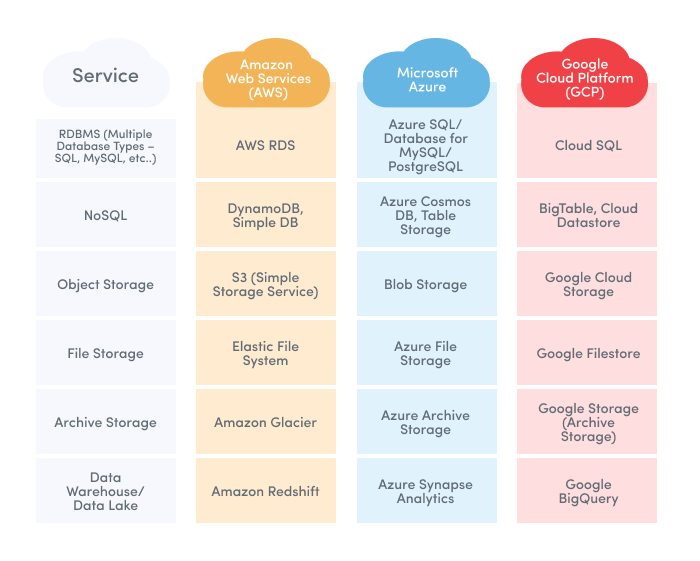
Public cloud deployment utilizes shared infrastructure operated by third party providers like AWS EC2, Azure Virtual Machines, and Google Compute Engine. Multiple users share the same physical infrastructure, with logical isolation ensuring security and privacy between tenants.
Cost Structure: Public cloud represents the most cost-effective option due to economies of scale. Providers spread infrastructure costs across thousands of customers, enabling competitive pricing that individual organizations cannot match when building private infrastructure.
Best Applications: Web applications, development and testing environments, content management systems, and non-sensitive workloads benefit from public cloud deployment. The shared cost model makes it ideal for variable workloads and organizations with limited IT budgets.
Real-World Examples:
Netflix: Streams content to millions of users using AWS public cloud infrastructure
Dropbox: Provides file storage and synchronization services through public cloud resources
Spotify: Delivers music streaming globally using Google Cloud public infrastructure
Private Cloud
Private cloud infrastructure dedicates computing resources exclusively to a single organization, either hosted on premises or by third party providers in isolated environments. This model provides enhanced security and compliance control for sensitive data and regulated industries.
Enhanced Security: Private clouds offer complete control over data location, access policies, and security configurations. Organizations maintain exclusive access to computing resources, eliminating concerns about shared infrastructure vulnerabilities.
Compliance Requirements: Industries with strict regulatory requirements – healthcare (HIPAA), financial services (PCI DSS), government (FedRAMP) – often require private cloud deployments to meet compliance mandates.
Real-World Examples:
JPMorgan Chase: Operates private cloud infrastructure for sensitive financial applications and customer data
Kaiser Permanente: Maintains private cloud systems for electronic health records and patient information
Government agencies: Deploy private clouds for classified or sensitive government applications
Hybrid Cloud
Hybrid deployment combines public and private cloud with secure interconnections, enabling workload portability between environments based on specific requirements. This approach optimizes cost and security by placing workloads in the most appropriate environment.
Workload Optimization: Sensitive data and critical applications run on private infrastructure while less sensitive workloads utilize cost-effective public cloud resources. Organizations can maintain compliance for regulated data while leveraging public cloud benefits for appropriate workloads.
Flexible Resource Access: Hybrid clouds enable “cloud bursting” – using public cloud resources during peak demand periods while maintaining core operations on private infrastructure. This provides cost-effective scalability without full public cloud migration.
Real-World Examples:
General Electric: Uses hybrid cloud for industrial IoT data processing, keeping sensitive operational data private while using public cloud for analytics
Walmart: Maintains private cloud for core retail operations while leveraging public cloud for seasonal demand and new applications
The choice between deployment models depends on security requirements, compliance mandates, budget constraints, and organizational risk tolerance. Many organizations start with public cloud for non-critical applications and gradually expand based on experience and confidence.
Common Use Cases and Applications
Cloud servers enable diverse applications that support organizational missions while providing flexibility and cost efficiency. Understanding these use cases helps identify opportunities to leverage cloud infrastructure effectively.
Web Hosting: Traditional websites, e-commerce platforms, and corporate portals run efficiently on cloud infrastructure. WordPress sites, online donation platforms, and member portals benefit from cloud servers’ scalability and reliability. Organizations can handle traffic spikes during campaigns or events without website performance issues.
Application Development: Modern software development relies heavily on cloud infrastructure for continuous integration/continuous deployment (CI/CD) pipelines, testing environments, and microservices architectures. Development teams can provision test environments instantly, run automated testing suites, and deploy applications faster than traditional infrastructure allows.
Big Data Analytics: Organizations processing large datasets for program evaluation, donor analysis, or impact measurement utilize cloud servers for Apache Spark clusters, data warehouses, and machine learning models. Cloud infrastructure provides the computational power needed for complex analytics without significant hardware investment.
Database Hosting: MySQL, PostgreSQL, and MongoDB instances run reliably on cloud servers with automated backups and replication capabilities. Cloud-hosted databases offer better disaster recovery, automated maintenance, and scaling capabilities than on-premises alternatives.
Content Delivery: Organizations distributing multimedia content, software downloads, or educational materials benefit from cloud-based content delivery networks. Global content caching reduces load times and improves user experience regardless of geographic location.
Enterprise Software: Customer relationship management (CRM) systems, enterprise resource planning (ERP) applications, and collaboration tools operate effectively on cloud infrastructure. These systems benefit from high availability, automatic updates, and integrated backup capabilities.
Gaming and Interactive Applications: Organizations developing educational games, interactive training modules, or virtual event platforms utilize cloud servers for multiplayer game servers and real-time interaction processing.
Mobile Apps: Backend services supporting mobile applications – user authentication, data storage, push notifications – run efficiently on scalable computing infrastructure. Cloud servers automatically adjust capacity based on app usage patterns.
The versatility of cloud servers enables organizations to support diverse technological needs without maintaining complex on-premises infrastructure, freeing resources for mission-focused activities.
Cloud Servers vs Traditional Physical Servers
Understanding the fundamental differences between cloud and traditional infrastructure helps organizations make informed decisions about their technology investments. The comparison reveals significant advantages in cost, flexibility, and management overhead.
Performance Comparison
Metric | Cloud Servers | Physical Servers |
|---|---|---|
Performance Consistency | Variable based on shared resources | Consistent with dedicated hardware |
Network Latency | 5-50ms depending on distance | 1-5ms for local applications |
Bandwidth | Up to 100 Gbps available | Limited by local network infrastructure |
Resource Scaling | Instant vertical/horizontal scaling | Manual hardware upgrades required |
Deployment Time | 5-10 minutes | 4-6 weeks for procurement and setup |
Metric
Cloud Servers
Physical Servers
Performance Consistency
Variable based on shared resources
Consistent with dedicated hardware
Network Latency
5-50ms depending on distance
1-5ms for local applications
Bandwidth
Up to 100 Gbps available
Limited by local network infrastructure
Resource Scaling
Instant vertical/horizontal scaling
Manual hardware upgrades required
Deployment Time
5-10 minutes
4-6 weeks for procurement and setup
Variable Performance: Cloud servers share underlying physical resources, which can create performance variability during peak usage periods. However, modern cloud providers implement sophisticated resource management that minimizes performance impact for most applications.
Latency Considerations: Applications requiring ultra-low latency may perform better on physical servers located on site. However, cloud providers now offer edge computing solutions that position virtual cloud servers closer to users, achieving sub-10ms latency in many regions.
Bandwidth Capabilities: Major cloud service providers offer network connectivity up to 100 Gbps, often exceeding what organizations can cost-effectively implement with physical infrastructure.
Cost Structure Differences
Cloud Servers: Operational expenses with transparent pay-per-use pricing starting around $5-50 per month for basic instances. Organizations pay only for consumed resources and can adjust spending based on actual usage patterns.
Physical Servers: Capital expenses requiring upfront investments of $5,000-$50,000+ per server, plus ongoing maintenance costs, electricity, cooling, and specialized IT staff. Total cost of ownership often exceeds cloud alternatives for small to medium workloads.
Hidden Cost Factors: Physical servers require dedicated physical space, climate control systems, backup power infrastructure, and security measures. These indirect costs often double the apparent hardware costs.
Cost Optimization: Cloud servers enable cost optimization through automated scaling, reserved instance pricing (30-70% discounts), and spot instance pricing for non-critical workloads.
Management and Maintenance
Cloud Servers:
Provider handles hardware failures, security updates, and infrastructure maintenance
Automated backup systems with geographic replication
Self-service provisioning through web interfaces
24/7 monitoring and support from cloud provider teams
Physical Servers:
In-house IT teams responsible for all maintenance and troubleshooting
Manual backup processes requiring staff oversight
Hardware procurement, installation, and configuration management
Emergency response for hardware failures often during off-hours
Resource Planning: Physical infrastructure requires capacity planning for peak demand, often resulting in 30-50% average utilization. Cloud servers eliminate this waste by providing resources on demand.
Business Continuity: Cloud infrastructure includes built-in redundancy across multiple data centers, providing disaster recovery capabilities that would require significant additional investment for physical infrastructure.
The comparison clearly demonstrates cloud servers’ advantages for most organizational needs, particularly for nonprofits and small businesses with limited IT resources and budget constraints.
Security and Compliance in Cloud Servers
Data security represents a critical concern for organizations handling donor information, client records, and sensitive operational data. Modern cloud infrastructure provides enterprise-level security capabilities that exceed what most organizations can implement independently.
Shared Responsibility Model: Cloud security operates on a shared responsibility framework. Cloud service providers secure the underlying infrastructure – physical security, network controls, hypervisor isolation, and hardware maintenance. Organizations remain responsible for securing their applications, data access controls, and user authentication systems.
Industry Certifications: Major cloud providers maintain comprehensive compliance certifications including SOC 2 Type II, ISO 27001, PCI DSS Level 1, and HIPAA compliance. These certifications require regular third-party audits and demonstrate adherence to strict security standards that individual organizations would find costly to achieve independently.
Data Encryption Standards: All major cloud platforms implement AES-256 encryption for data storage and TLS 1.2+ encryption for data transmission. This military-grade encryption protects information both when stored in cloud systems and when transmitted across networks. Organizations can manage their own encryption keys for additional security control.
Access Controls: Modern cloud platforms provide sophisticated identity and access management systems with multi-factor authentication, role-based access controls, and detailed audit logging. These systems enable organizations to implement principle-of-least-privilege access while maintaining detailed records of all system access.
Network Security: Virtual private clouds, network firewalls, and distributed denial-of-service (DDoS) protection provide comprehensive network security. These systems protect against both external attacks and internal threats through sophisticated monitoring and automated response capabilities.
Compliance Tools: Cloud platforms offer automated compliance monitoring, detailed audit trails, and comprehensive reporting capabilities. These tools simplify compliance management and provide evidence needed for regulatory audits.
Data Residency Controls: Organizations can specify geographic locations for data storage and processing to meet regulatory requirements or organizational policies. This capability ensures compliance with regulations requiring data to remain within specific jurisdictions.
Continuous Monitoring: Cloud providers implement 24/7 security monitoring with automated threat detection and response capabilities. This level of monitoring exceeds what most organizations can maintain with internal resources.
For organizations handling sensitive data, cloud servers often provide superior security compared to on-premises alternatives, while reducing the complexity and cost of maintaining enterprise-level security systems.
Cost Considerations and Pricing Models
Understanding cloud pricing models and cost optimization strategies enables organizations to maximize value from their technology investments while maintaining predictable budgets aligned with mission priorities.
Pricing Models
Pricing Model | Hourly Rate Range | Discount Potential | Best For |
|---|---|---|---|
On-Demand | $0.02 - $3.00+ per hour | None | Variable workloads, testing |
Reserved Instances | $0.014 - $2.10+ per hour | 30-70% discount | Predictable workloads |
Spot Instances | $0.006 - $0.90+ per hour | Up to 90% discount | Flexible, interruption-tolerant workloads |
Dedicated Hosts | $1,000 - $5,000+ per month | Volume discounts available | Compliance, licensing requirements |
Pricing Model
Hourly Rate Range
Discount Potential
Best For
On-Demand
$0.02 – $3.00+ per hour
None
Variable workloads, testing
Reserved Instances
$0.014 – $2.10+ per hour
30-70% discount
Predictable workloads
Spot Instances
$0.006 – $0.90+ per hour
Up to 90% discount
Flexible, interruption-tolerant workloads
Dedicated Hosts
$1,000 – $5,000+ per month
Volume discounts available
Compliance, licensing requirements
On-Demand Pricing: Pay-per-hour billing with no long-term commitments provides maximum flexibility for variable workloads. Rates typically range from $0.02-$3.00+ per hour based on instance size and region. This model suits development environments, temporary projects, and organizations with unpredictable usage patterns.
Reserved Instances: One to three-year commitments provide 30-70% cost savings compared to on-demand pricing. Organizations with predictable workloads can significantly reduce costs through reserved capacity planning. Payment options include all-upfront, partial-upfront, or no-upfront terms.
Spot Instances: Unused cloud capacity available at up to 90% discounts with potential interruption when capacity is needed elsewhere. This pricing model works well for batch processing, data analysis, and non-critical workloads that can tolerate occasional interruptions.
Dedicated Hosts: Physical server rental starting around $1,000-$5,000+ per month provides compliance benefits and software licensing advantages for organizations with specific requirements.
Cost Optimization Strategies
Right-Sizing Analysis: Regular monitoring of resource utilization identifies opportunities to optimize instance sizes. Many organizations start with oversized instances and can reduce costs 20-40% by matching resources to actual usage patterns.
Automated Scaling: Configure auto-scaling policies that adjust capacity based on demand patterns. Scale down during off-hours, weekends, and low-activity periods to eliminate costs for unused resources.
Storage Optimization: Use appropriate storage tiers for different data types. Frequently accessed data uses high-performance storage, while archival data moves to lower-cost storage options, reducing storage costs by 50-80%.
Geographic Cost Arbitrage: Different cloud regions offer varying pricing structures. Organizations can reduce costs 10-30% by selecting optimal regions while maintaining acceptable performance.
Scheduled Scaling: Implement time-based scaling for predictable usage patterns. Development environments can automatically shut down outside business hours, reducing costs 60-70% for non-production workloads.
Multi-Cloud Strategy: Leverage competitive pricing across different cloud service providers for specific workloads, avoiding vendor lock-in while optimizing costs.
Total Cost of Ownership Analysis
Cloud servers often provide superior total cost of ownership compared to physical infrastructure when considering:
Eliminated hardware procurement and depreciation
Reduced facility costs (power, cooling, physical space)
Decreased staffing requirements for infrastructure management
Improved disaster recovery and business continuity
Faster deployment and scaling capabilities
Organizations typically achieve 25-50% cost reduction compared to traditional infrastructure while gaining significantly improved capabilities and flexibility.
Future Trends in Cloud Server Technology
Understanding emerging trends helps organizations make strategic technology decisions that position them for long-term success while avoiding obsolete investments.
Edge Computing Revolution: Cloud infrastructure is expanding closer to end-users through edge computing deployment. Edge servers positioned in local data centers, cellular towers, and regional hubs deliver sub-10ms latency for real-time applications. This trend enables new applications like augmented reality, real-time collaboration, and IoT data processing that require immediate response times.
Serverless Computing Growth: Function-as-a-Service platforms eliminate server management overhead by automatically scaling individual application functions. Organizations can deploy code without provisioning or managing virtual servers, paying only for actual execution time. This model reduces operational complexity and costs for event-driven applications.
AI-Powered Optimization: Machine learning algorithms increasingly optimize cloud resource allocation, cost management, and performance tuning automatically. These systems analyze usage patterns to predict capacity needs, optimize costs through automated scaling, and identify security threats before they impact operations.
Quantum Computing Access: Cloud providers are beginning to offer access to quantum processors for specialized calculations. While still experimental, quantum computing promises breakthrough capabilities for optimization problems, cryptography, and scientific simulations.
Sustainable Green Computing: Cloud providers are investing heavily in renewable energy and carbon-neutral data centers. AWS, Google, and Microsoft have committed to carbon neutrality, making cloud computing more environmentally sustainable than traditional data centers.
Container Orchestration Standardization: Kubernetes and Docker containerization technologies are becoming standard for application deployment and scaling. These technologies enable more efficient resource utilization and simplified application management across multiple cloud servers.
ARM-Based Processor Adoption: Alternative processor architectures like AWS Graviton2 and Apple M1-based cloud instances offer better price-performance ratios for many workloads. These processors provide similar performance at 20-40% lower costs compared to traditional x86 processors.
Enhanced Security Integration: Zero-trust security models and integrated threat detection become standard cloud features. These capabilities provide comprehensive security monitoring and automated threat response without additional infrastructure investment.
Organizations should monitor these trends to identify opportunities for improved capabilities, cost reduction, and competitive advantage in their technology strategies.
Choosing the Right Cloud Server Solution
Selecting optimal cloud infrastructure requires systematic evaluation of organizational needs, technical requirements, and strategic objectives. This framework guides decision-making while avoiding common pitfalls.
Workload Assessment: Begin with comprehensive analysis of computing requirements. Document current applications’ CPU, memory, storage, and network demands. Identify peak usage periods, growth projections, and performance requirements. This assessment provides the foundation for appropriate instance sizing and configuration selection.
Budget Planning: Establish realistic budget parameters including initial migration costs, ongoing operational expenses, and growth capacity. Compare total cost of ownership over 3-5 year periods, including soft costs like staff time and training requirements. Consider budget flexibility for scaling during growth periods or special initiatives.
Compliance Evaluation: Determine regulatory requirements that impact cloud deployment decisions. Organizations handling healthcare data (HIPAA), payment information (PCI DSS), or government contracts may require specific security certifications, data residency controls, or audit capabilities. Ensure selected cloud service providers maintain necessary compliance certifications.
Geographic Strategy: Select cloud regions that optimize performance for your primary user base while meeting data residency requirements. Users accessing systems from the West Coast should utilize West Coast data centers for optimal performance. International organizations may require multi-region deployment for consistent global performance.
Integration Requirements: Evaluate compatibility with existing systems, applications, and workflows. Consider API availability, data migration complexity, and staff training requirements. Plan for integration with accounting systems, donor management platforms, and other critical business applications.
Support Level Assessment: Compare available support options including 24/7 availability, response time commitments, and technical expertise levels. Organizations with limited internal IT resources may require premium support plans with faster response times and proactive monitoring.
Vendor Lock-in Mitigation: Plan for data portability and potential future migration between providers. Understand data export capabilities, API compatibility, and application dependencies that might complicate provider changes. Maintain some level of provider independence through standardized technologies and portable data formats.
Performance Testing: Conduct proof-of-concept deployments before full migration to validate performance assumptions and identify potential issues. Test representative workloads under realistic conditions to ensure selected configurations meet performance requirements.
Scalability Planning: Design infrastructure with growth capacity and scaling mechanisms. Consider both vertical scaling (larger instances) and horizontal scaling (more resources) strategies. Plan for seasonal variations, special events, and long-term organizational growth.
Security Assessment: Evaluate security features including encryption capabilities, access controls, monitoring tools, and compliance reporting. Ensure selected solutions meet organizational security standards and regulatory requirements.
Training and Change Management: Plan for staff training on new cloud management tools and processes. Cloud infrastructure requires different operational procedures compared to physical servers. Invest in training to maximize benefits and avoid operational issues.
Migration Strategy: Develop phased migration plans that minimize disruption to ongoing operations. Start with non-critical applications to build confidence and experience before migrating mission-critical systems. Plan for parallel operation during transition periods to ensure business continuity.
By systematically evaluating these factors, organizations can select cloud server solutions that deliver optimal value, performance, and strategic alignment with their mission objectives.
Conclusion
Cloud servers represent a transformative opportunity for nonprofits and service-based organizations to modernize their technology infrastructure while redirecting resources toward mission-critical activities. The shift from capital-intensive physical servers to flexible, scalable cloud infrastructure eliminates traditional barriers to enterprise-level computing capabilities.
The compelling advantages are clear: dramatically reduced upfront costs through pay as you go pricing, instant scalability that adapts to changing needs, enterprise-grade security that protects sensitive donor data, and 99.9% uptime reliability that ensures your systems remain available when your community needs them most. Perhaps most importantly, cloud servers free your team from complex infrastructure management, allowing you to focus on advancing your mission rather than troubleshooting hardware issues.
Whether you choose public cloud for cost efficiency, private cloud for enhanced security, or hybrid cloud for optimal flexibility, the key lies in aligning your cloud strategy with your organizational priorities. Start with a clear assessment of your current needs, plan for future growth, and select solutions that provide the security and compliance capabilities your stakeholders deserve.
The future of cloud computing promises even greater capabilities through edge computing, artificial intelligence optimization, and sustainable green data centers. Organizations that embrace cloud infrastructure today position themselves to leverage these emerging technologies while building more resilient, efficient operations.
Your mission deserves technology that empowers rather than encumbers your team’s efforts. Cloud servers provide the foundation for that transformation, delivering enterprise capabilities at nonprofit-friendly prices while ensuring your data remains secure and your operations remain reliable.
Ready to explore how cloud servers can streamline your operations and protect your data? The journey begins with understanding your current needs and envisioning how modern cloud infrastructure can amplify your mission impact.