
TL;DR: Cloud applications run on remote servers you reach through a web browser or mobile app, and they come in three service models (SaaS, PaaS, and IaaS) that trade control for convenience. They lower infrastructure costs, scale on demand, and strengthen security and accessibility, while internet dependency, vendor lock-in, and compliance still need planning. Scottship Solutions helps nonprofits weigh these tradeoffs and adopt cloud based tools that fit their mission and budget.
Whether you’re checking email, collaborating on documents, or managing customer relationships, you’re likely using cloud applications every day without even thinking about it. These powerful software solutions have transformed how organizations operate, offering unprecedented flexibility, security, and cost-effectiveness that traditional software simply cannot match.
A cloud application represents a fundamental shift from desktop-bound software to internet-accessible solutions that store data and perform processing on remote servers managed by cloud service providers. Unlike traditional applications that tie you to specific devices and locations, cloud apps empower teams to work from anywhere while maintaining enterprise-level security and performance.
With 94% of enterprises using cloud services as of 2025, understanding cloud applications has become essential for any organization looking to streamline operations, protect sensitive data, and scale efficiently. From Gmail’s 1.8 billion users to Salesforce’s customer relationship management platform serving over 150,000 companies, cloud applications have proven their value across every industry and organization size.
What is a Cloud Application?
A cloud application is a software program that runs primarily on remote servers hosted in data centers operated by cloud service providers, rather than on local devices. Users access these applications through web browsers or mobile apps, while the heavy lifting of data processing and storage occurs in the cloud infrastructure managed by providers like Amazon Web Services, Google
- What is a Cloud Application?
- How Do Cloud Applications Work?
- What Are the Types of Cloud Applications?
- What Are the Key Benefits of Cloud Applications?
- What Are the Challenges of Cloud Applications?
- What Does the Cloud Application Development Process Look Like?
- What Are Popular Cloud Application Examples?
- How Do Cloud Applications Compare to Traditional Applications?
- What Are the Future Trends in Cloud Applications?

The term cloud application encompasses any software that runs on cloud computing resources to deliver functionality over the internet. This includes everything from simple email services to complex enterprise resource planning systems. What makes these applications unique is their distributed architecture. While users interact with the interface on their local device, the core processing logic and data storage happen on powerful remote servers.
Unlike traditional desktop applications that require installation and consume local storage space, cloud based applications run in web browsers or lightweight client applications. This fundamental difference enables several key advantages: automatic updates without user intervention, cross-platform compatibility across different operating systems, and the ability to access your data from any internet connected device.
The distinction between a web application and a cloud app lies in their architecture. While web applications require continuous internet connectivity for all functions, cloud applications can often work offline through local caching, syncing data when connectivity returns. This hybrid approach provides the best of both worlds, the accessibility of web apps with the reliability of local applications.
How Do Cloud Applications Work?
Cloud applications operate on a client-server architecture where user devices function as lightweight interfaces that communicate with powerful backend systems. When you open a cloud app, your device sends requests through the internet to remote servers located in secure data centers around the world.
The client side component, what you see and interact with, handles the user interface and basic input processing. Meanwhile, the server side manages the heavy computational work, data storage, and business logic. This division of labor allows even basic devices to run sophisticated applications that would otherwise require substantial computing power and storage resources.
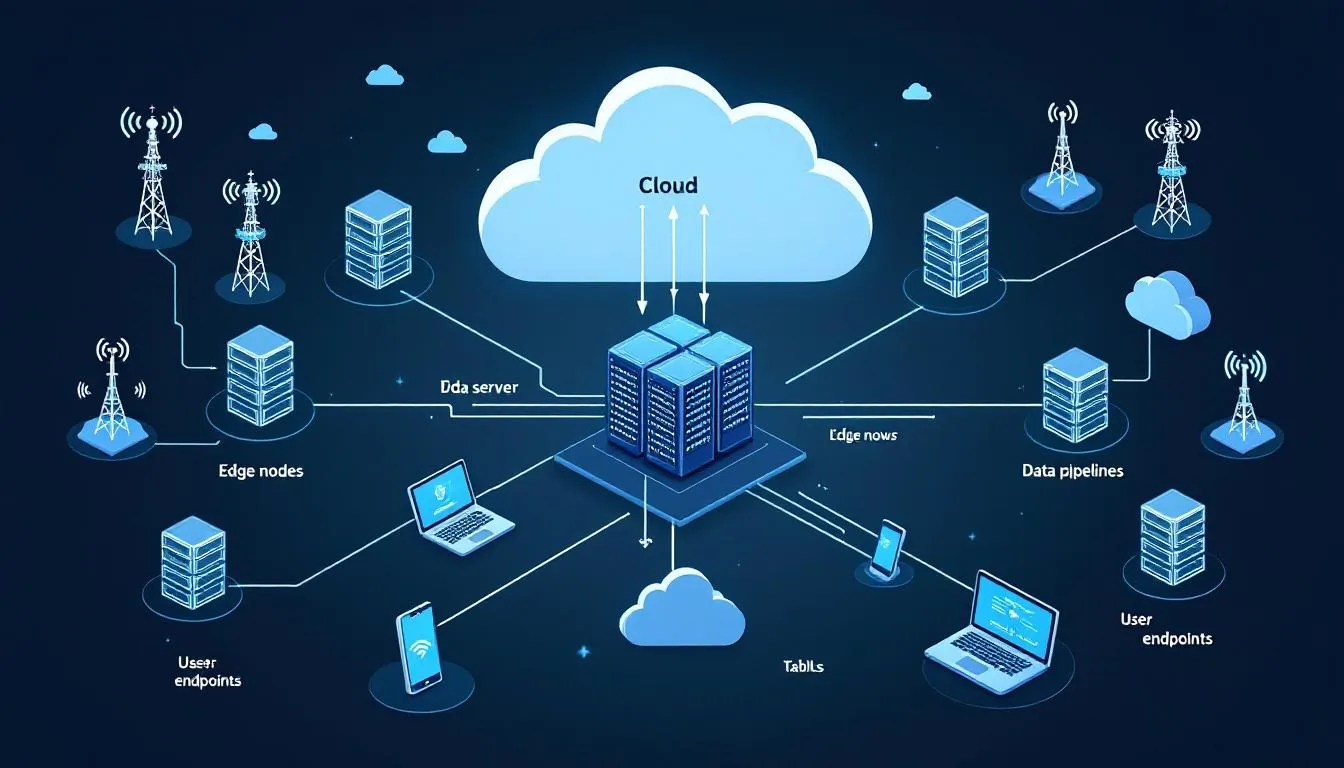
Internet connectivity serves as the bridge between users and cloud services, enabling real-time data synchronization across multiple devices. When you edit a document in Google Workspace or update a customer record in Salesforce, those changes are immediately processed by remote servers and made available to other authorized users within seconds.
Cloud service providers maintain massive data centers with redundant systems to ensure optimal performance and reliability. These facilities include physical servers, networking equipment, cooling systems, and backup power supplies, all monitored 24/7 by technical teams. This underlying infrastructure allows organizations to access enterprise-grade computing resources without the massive capital investment required for on-premises solutions.
The beauty of this architecture lies in its scalability. As demand increases, cloud platforms can automatically allocate additional computing power and storage space within minutes. This elastic scaling ensures applications remain responsive during peak usage periods while optimizing costs during quieter times.
What Are the Types of Cloud Applications?
Cloud computing services are typically categorized into three main service models, each offering different levels of control, flexibility, and management responsibility. Understanding these categories helps organizations choose the right type of cloud solution for their specific needs and technical expertise.
Software as a Service (SaaS)
Software as a Service represents the most user-friendly category of cloud applications, delivering fully functional software programs through web browsers without requiring local installation or maintenance. SaaS applications handle everything from the underlying infrastructure to the application software itself, allowing users to focus entirely on their work rather than technical management.
Popular examples of saas applications include Slack with its 430 million users worldwide, Zoom serving 300 million daily participants, and Adobe Creative Cloud providing professional design tools to millions of creative professionals. These platforms demonstrate how SaaS has democratized access to powerful software that was once prohibitively expensive for smaller organizations.
The subscription-based pricing model characteristic of SaaS makes advanced software accessible to organizations of all sizes. Instead of paying large upfront licensing fees, users pay monthly or annual subscriptions that often include automatic updates, technical support, and enhanced security features. This approach has made SaaS represent 75% of total cloud spending in 2025, highlighting its overwhelming popularity.
SaaS applications excel in scenarios requiring minimal customization and rapid deployment. Organizations can typically start using these applications within hours of signing up, compared to weeks or months required for traditional software implementation.
Platform as a Service (PaaS)
Platform as a Service provides cloud environments specifically designed for application development and deployment. PaaS solutions handle the underlying infrastructure, operating systems, and development frameworks, allowing developers to focus on writing code and building innovative and creative solutions without managing servers or networking complexities.
Examples include Google App Engine, which automatically scales applications based on traffic, Heroku for rapid web app development, and Microsoft Azure App Service for enterprise-grade application hosting. These platforms support multiple programming languages and frameworks, making them versatile tools for diverse development projects.
PaaS proves particularly valuable for organizations with internal development teams who want to build custom applications without investing in extensive infrastructure. Developers can deploy software quickly using built-in deployment tools, implement continuous monitoring for optimal performance, and scale applications automatically as user demand grows.
The creative solutions enabled by PaaS platforms often require minimal customization once deployed, as the underlying platform handles most operational concerns. This allows development teams to iterate rapidly and respond to business needs without getting bogged down in infrastructure management.
Infrastructure as a Service (IaaS)
Infrastructure as a Service provides virtualized computing resources that organizations can use to build their own cloud environments. IaaS gives users access to virtual machines, storage systems, and networking capabilities while maintaining control over operating systems, applications, and configurations.
Major IaaS providers include Amazon EC2, which powers millions of virtual machines globally, Google Compute Engine for scalable computing resources, and Microsoft Azure Virtual Machines for enterprise workloads. These services operate on a pay-per-use model, allowing organizations to scale resources up or down based on actual demand.
IaaS works best for organizations with significant technical expertise who need maximum control over their computing environment. Common use cases include disaster recovery solutions, development and testing environments, and applications that require specific operating system configurations or compliance requirements.
Financial institutions and other organizations handling sensitive data often prefer IaaS because it allows them to implement custom security measures while benefiting from the scalability and cost effectiveness of cloud computing. The underlying infrastructure remains the responsibility of the cloud provider, but users maintain control over data security and access controls.
What Are the Key Benefits of Cloud Applications?
Cloud applications deliver transformational advantages that extend far beyond simple cost savings. These benefits fundamentally change how organizations operate, enabling new levels of efficiency, collaboration, and innovation that would be impossible with traditional software approaches.
Cost Efficiency stands out as perhaps the most immediate benefit, with industry reports showing organizations can reduce IT infrastructure costs by 20-30% by migrating to cloud based services. This reduction comes from eliminating the need to purchase, maintain, and upgrade physical servers, along with reducing the technical expertise required for day-to-day operations. Organizations pay only for the computing power and storage space they actually use, converting large capital expenditures into predictable operational expenses.
Scalability provides unprecedented flexibility for growing organizations. Cloud platforms offer auto-scaling capabilities that adjust resources based on demand within minutes, ensuring applications remain responsive during peak usage periods while minimizing costs during quieter times. This elastic scaling would require massive upfront investment and ongoing management with traditional infrastructure.

Enhanced Security often surprises organizations who assume cloud storage is less secure than local systems. Major cloud service providers invest billions in robust security measures that most organizations could never afford independently. These include data encryption both in transit and at rest, multi-factor authentication, continuous monitoring for threats, and compliance certifications for industries with strict regulatory requirements.
Accessibility transforms how teams work together. Cloud applications enable users to access their work from any device with an internet connection, supporting remote teams and flexible work arrangements. Real-time collaboration features, like Google Docs supporting 50+ simultaneous editors, eliminate the version control problems that plague traditional document sharing.
Automatic Updates ensure organizations always have access to the latest features and security patches without requiring IT intervention. Cloud service providers handle all maintenance, updates, and security improvements behind the scenes, allowing internal teams to focus on mission-critical activities rather than software maintenance.
Business Continuity receives a significant boost from cloud applications, with major providers offering 99.9% uptime service level agreements. This reliability, combined with automatic backups and disaster recovery capabilities, protects organizations from data loss and ensures operations can continue even during local emergencies or equipment failures.
What Are the Challenges of Cloud Applications?
While cloud applications offer numerous benefits, organizations must carefully evaluate potential challenges to make informed decisions about their cloud computing strategy. Understanding these considerations helps in developing strategies to mitigate risks and maximize the advantages of cloud adoption.
Internet Dependency represents the most obvious limitation of cloud based apps. When internet connectivity fails, users cannot access their applications or data stored in cloud environments. While many cloud apps offer offline functionality through local caching, this typically provides limited capabilities compared to full online access. Organizations in areas with unreliable internet infrastructure need robust backup connectivity solutions.
Data Security concerns persist despite the enhanced security measures implemented by cloud providers. Some organizations worry about storing sensitive data on servers they don’t directly control, particularly those in heavily regulated industries like healthcare or finance. While cloud service providers implement extensive security protocols, the shared responsibility model means organizations must still manage user access controls and protect sensitive data through proper configuration.
Vendor Lock-in can create long-term strategic challenges. Once organizations build their business processes around specific cloud platforms, migrating to alternative providers becomes complex and expensive. Proprietary technologies, data formats, and integration methods can make switching costs prohibitive, potentially limiting future flexibility.
Compliance Requirements add complexity for organizations in regulated industries. Financial institutions, healthcare providers, and government agencies face strict requirements about data residency, encryption standards, and audit trails. While major cloud providers offer compliance certifications, organizations must carefully verify that their chosen solutions meet all applicable regulations.

Performance Latency can impact user experience, particularly for applications requiring real-time responsiveness. Geographic distance from data centers, network congestion, and internet routing can introduce delays that affect productivity. Organizations with global teams may need to consider multi-region deployments to optimize performance.
Security Concerns extend beyond data protection to include access management and monitoring. While cloud environments can be more secure than traditional systems, they require proper configuration and ongoing management. Data breaches often result from misconfigured cloud settings rather than provider security failures, emphasizing the importance of proper implementation and continuous monitoring.
What Does the Cloud Application Development Process Look Like?
Cloud app development follows a structured approach that relies on cloud native technologies and best practices to create scalable, secure, and maintainable applications. This process differs significantly from traditional application development by emphasizing automation, microservices architecture, and continuous deployment from the earliest planning stages.
Planning Phase begins with defining clear business requirements and technical specifications that align with cloud capabilities. Development teams must consider factors like expected user loads, data storage requirements, integration needs with existing systems, and compliance requirements. This phase also involves selecting the appropriate cloud platform (whether Amazon Web Services, Google Cloud, Microsoft Azure, or Oracle Cloud Infrastructure) based on specific technical and business needs.
Architecture Design decisions fundamentally impact application performance and maintainability. Modern cloud applications typically adopt microservices architecture, breaking functionality into smaller, independent services that can be developed, deployed, and scaled separately. This approach contrasts with traditional monolithic applications and enables teams to use different technologies for different services while improving fault tolerance and scalability.
Development relies on cloud native frameworks and tools optimized for cloud environments. Popular choices include Spring Boot for Java applications, Express.js for Node.js development, and React or Angular for front-end interfaces. Cloud app development emphasizes API-first design, enabling applications to integrate easily with cloud based services and third-party systems.

Testing in cloud environments requires comprehensive automation to handle the complexity of distributed systems. Teams implement automated unit testing, integration testing, and security scanning throughout the development process. Performance testing becomes particularly important to ensure applications handle varying loads and network conditions effectively.
Deployment relies on CI/CD pipelines with tools like Jenkins, GitLab, or AWS CodePipeline to automate the process of moving code from development to production. These pipelines include automated testing, security scanning, and deployment to multiple cloud environments, enabling rapid iteration and reducing the risk of human error.
Monitoring represents an ongoing responsibility that extends beyond traditional application monitoring. Cloud applications require monitoring of application performance, infrastructure usage, security events, and user experience metrics. Services like CloudWatch, Datadog, or New Relic provide comprehensive visibility into application health and performance across distributed cloud environments.
What Are Popular Cloud Application Examples?
The cloud computing market features numerous successful applications that demonstrate the power and versatility of cloud based solutions across different industries and use cases. These examples illustrate how organizations of all sizes use cloud apps to improve efficiency, reduce costs, and enable new capabilities.
Business Productivity applications have revolutionized workplace collaboration. Microsoft 365 serves over 400 million subscribers with integrated email, document editing, and communication tools that enable seamless remote work. Google Workspace reaches 3 billion users worldwide, providing cloud storage, real-time document collaboration, and video conferencing capabilities that have become essential for modern business operations.
Customer Relationship Management platforms demonstrate how cloud applications can transform business processes. Salesforce, serving over 150,000 companies worldwide, pioneered the SaaS model and continues to lead in cloud based customer management. HubSpot, with 128,000+ customers, provides integrated marketing, sales, and service tools that help organizations grow more effectively than traditional, disconnected software systems.
Communication platforms have redefined how teams stay connected. Slack boasts 18 million daily active users who rely on cloud based messaging for project coordination and team communication. Microsoft Teams has grown to 280 million monthly users, integrating video calls, file sharing, and app integration in a single cloud platform that supports hybrid work models.
File Storage services showcase the practical benefits of cloud storage over traditional local storage. Dropbox serves 700 million users who access their files from any device, while Google Drive has reached 1 billion users who benefit from integrated editing tools and generous storage allocations.

Entertainment Streaming represents perhaps the most visible success story of cloud applications. Netflix serves 260 million subscribers globally with cloud infrastructure that automatically scales to handle peak viewing periods. Spotify’s 500 million users demonstrate how cloud platforms enable global distribution of digital content with personalized recommendations powered by cloud computing analytics.
E-commerce Platforms enable businesses to sell online without managing complex web infrastructure. Shopify powers 2 million businesses with cloud based stores that handle everything from payment processing to inventory management. BigCommerce serves 60,000+ stores with enterprise-grade features accessible through simple web interfaces.
These examples highlight how cloud applications enable innovative and creative solutions that would be impossible or prohibitively expensive with traditional software approaches. They demonstrate the platform independent nature of cloud solutions and their ability to scale from individual users to global enterprises.
How Do Cloud Applications Compare to Traditional Applications?
Understanding the fundamental differences between cloud and traditional applications helps organizations make informed decisions about their technology investments. These differences extend beyond deployment methods to impact cost structures, maintenance requirements, security approaches, and user experience.
|
Aspect |
Cloud Applications |
Traditional Applications |
|---|---|---|
|
Deployment Speed |
Deploy in hours with instant provisioning |
Weeks or months for installation and configuration |
|
Maintenance |
Cloud providers handle infrastructure maintenance |
In-house IT teams manage all hardware and software |
|
Scalability |
Elastic scaling based on demand |
Fixed capacity limited by physical hardware |
|
Cost Structure |
Subscription or usage-based pricing |
Large upfront capital expenditure |
|
Security |
Shared responsibility model with provider expertise |
Full organizational responsibility |
|
Accessibility |
Global access from any internet connected device |
Office-bound usage on specific computers |
Aspect
Cloud Applications
Traditional Applications
Deployment Speed
Deploy in hours with instant provisioning
Weeks or months for installation and configuration
Maintenance
Cloud providers handle infrastructure maintenance
In-house IT teams manage all hardware and software
Scalability
Elastic scaling based on demand
Fixed capacity limited by physical hardware
Cost Structure
Subscription or usage-based pricing
Large upfront capital expenditure
Security
Shared responsibility model with provider expertise
Full organizational responsibility
Accessibility
Global access from any internet connected device
Office-bound usage on specific computers
Deployment Speed represents one of the most dramatic differences. Cloud applications can be operational within hours of signup, while traditional software installations often require weeks of planning, hardware procurement, and configuration. This speed advantage enables organizations to respond quickly to changing business needs and market opportunities.
Maintenance responsibilities shift significantly with cloud adoption. Traditional applications require organizations to hire technical expertise, purchase hardware, manage updates, and handle security patches. Cloud providers assume these responsibilities, allowing internal teams to focus on business objectives rather than infrastructure management.
Scalability limitations of traditional applications often force organizations to over-provision hardware to handle peak loads, resulting in wasted resources during normal operations. Cloud applications automatically scale computing power and storage resources based on actual demand, optimizing both performance and costs.
Cost Structure differences extend beyond initial savings to impact cash flow and budgeting. Traditional applications require large capital investments that depreciate over time, while cloud applications convert these into predictable operational expenses that scale with usage and business growth.
Security approaches differ in their resource requirements and effectiveness. While traditional applications place full security responsibility on organizations, cloud providers invest billions in security measures that most organizations cannot afford independently. The shared responsibility model means organizations focus on user access and data protection while providers handle infrastructure security.
Accessibility transforms work patterns and collaboration possibilities. Traditional applications tie users to specific devices and locations, limiting flexibility and remote work capabilities. Cloud applications enable users access from anywhere with internet connectivity, supporting distributed teams and flexible work arrangements.
What Are the Future Trends in Cloud Applications?
The cloud computing market continues to evolve rapidly, driven by advancing technologies, changing business requirements, and new user expectations. Understanding these trends helps organizations prepare for the future and make strategic technology decisions that will remain relevant as the industry develops.
Artificial Intelligence Integration is reshaping cloud applications across all industries. Industry analysts predict that 75% of cloud apps will include AI features by 2025, enabling capabilities like automated customer service, predictive analytics, and intelligent document processing. This integration allows organizations to use advanced AI capabilities without developing machine learning expertise internally.
Edge Computing addresses performance requirements for applications that require minimal latency. By processing data closer to users rather than in centralized data centers, edge computing enables real-time applications for autonomous vehicles, industrial automation, and Internet of Things devices. This trend reduces dependence on internet connectivity while maintaining cloud scalability benefits.
Serverless Computing continues growing at 25% annually through 2026, enabling developers to focus entirely on application logic without managing underlying infrastructure. Function-as-a-Service (FaaS) platforms automatically scale individual functions based on demand, optimizing costs and simplifying deployment for event-driven applications.

Multi-Cloud Strategies are becoming standard practice, with 87% of enterprises using multiple cloud providers by 2025. This approach reduces vendor lock-in risks, optimizes costs by drawing on different providers’ strengths, and improves disaster recovery capabilities. However, it also increases complexity and requires sophisticated management tools.
Container Orchestration has reached mainstream adoption, with Kubernetes usage reaching 96% of organizations using containers. This technology enables consistent deployment across different cloud environments while improving resource usage and application portability between cloud providers.
Zero-Trust Security models are becoming essential for cloud applications handling sensitive data. This approach assumes no user or device is inherently trustworthy and requires verification for every access request. Zero-trust architectures provide enhanced security for remote teams and cloud environments while maintaining user experience quality.
Quantum Computing integration represents a longer-term trend that could revolutionize cloud applications requiring massive computational power. While still in early stages, quantum cloud services are beginning to appear for specialized applications in cryptography, optimization, and scientific computing.
These trends indicate that cloud applications will become even more powerful, secure, and accessible in coming years. Organizations that embrace these developments will gain competitive advantages through improved efficiency, enhanced security, and access to advanced technologies that would be impossible to develop independently.
Cloud applications have fundamentally transformed how organizations operate, offering unprecedented combinations of accessibility, scalability, and cost effectiveness that traditional software simply cannot match. As 94% of enterprises have already discovered, embracing cloud technology isn’t just about keeping up with trends. It is about unlocking new possibilities for growth, collaboration, and innovation.
The journey to cloud adoption requires careful planning and consideration of factors like data security, compliance requirements, and integration with existing systems. However, the benefits (from automatic updates and enhanced security to global accessibility and elastic scaling) far outweigh the challenges for most organizations.
Whether you’re a small nonprofit looking to protect donor data while maximizing your mission impact, or a growing business seeking to streamline operations and reduce costs, cloud applications offer solutions that adapt to your needs rather than forcing you to adapt to software limitations. The future belongs to organizations that use these powerful tools to focus on what matters most: serving their communities and achieving their goals.
Ready to explore how cloud applications can transform your organization’s operations while ensuring enterprise-level security? Consider scheduling a consultation to discuss how cloud based solutions can align with your mission and help you achieve greater impact with fewer resources.
Frequently Asked Questions
What is the difference between a cloud application and a web application?
Web applications require continuous internet connectivity for every function, while cloud applications can often work offline through local caching and then sync data when the connection returns. That hybrid approach gives you the accessibility of web apps with more of the reliability of local software.
What are the main types of cloud applications?
Cloud computing services fall into three service models. Software as a Service (SaaS) delivers ready to use software through a browser, such as Slack or Zoom. Platform as a Service (PaaS) gives developers an environment to build and deploy applications without managing servers, such as Google App Engine or Heroku. Infrastructure as a Service (IaaS) provides virtual machines, storage, and networking you control, such as Amazon EC2 or Google Compute Engine.
How much can an organization save by moving to cloud applications?
Industry reports show organizations can reduce IT infrastructure costs by 20 to 30 percent after migrating to cloud based services, since they stop buying, maintaining, and upgrading physical servers and pay only for the computing power and storage they actually use.
How does a nonprofit choose the right cloud applications?
The right choice depends on how much control your team wants, your budget, and your compliance requirements. Scottship Solutions helps nonprofits compare SaaS, PaaS, and IaaS options and adopt cloud based tools that fit their mission, while planning for tradeoffs like internet dependency, vendor lock-in, and data security.

Written by
Josh Bass
Cybersecurity Consultant at Scottship Solutions
Josh leads security assessments and compliance audits for mission-driven organizations. He helps nonprofits build defensible security postures, meet HIPAA and state privacy requirements, and respond to threats before they become incidents.
Certifications
CompTIA Security+ Certified
Industries Served
Healthcare & Community Health (HIPAA), Human Services, Child Advocacy, Foundations & Grantmakers